Notes

Reporting Slop

Today I'm introducing slop reporting.

There's now a small poop button on every story and comment. Click it to report slop and click it again to retract your report.

You can find the Report Slop button in a story's overflow menu.
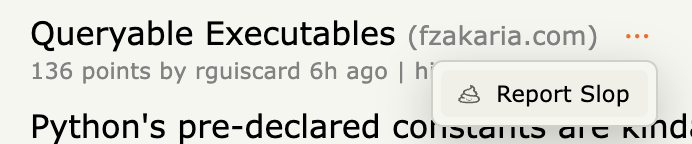
Report Slop in a story's overflow menu

What is slop? I consider slop to be low-effort, AI-generated content. When reporting, try to be charitable: content that looks AI-generated may have required substantial human effort.

This is an experiment, so things will change. I haven't mapped out every detail – how people use it will guide what comes next. Possible next steps include:

  1. Show an optional slop badge on stories and comments.
  2. Let people hide community-voted slop.
  3. Let people hide domains and users whose work is repeatedly reported as slop.

Feedback is welcome at [email protected].

Don't want to see the poop button? Go to Settings → Appearance → Hide story elements and click it in the preview.
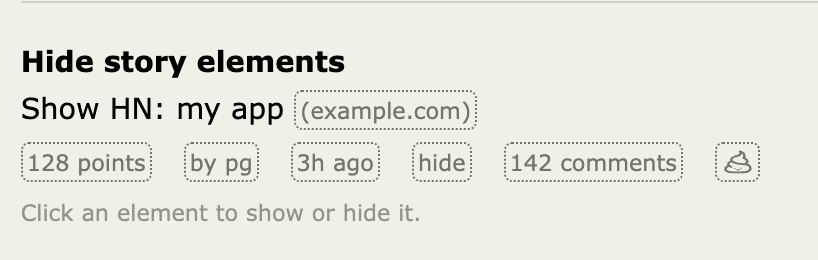
Hide story elements setting with the poop button alongside the story metadata

A Minimal Browser Extension

I've released a browser extension1.

Links: Chrome | Firefox | GitHub | Safari coming soon

It works as a bridge to HN, letting you upvote, favorite, hide, flag, and reply using your logged-in HN account, all without leaving hcker.news.

Features:

  • Do HN actions on hcker.news
  • See your HN username and karma in the top-right corner of hcker.news
  • From an HN thread, click the extension icon to open the corresponding page on hcker.news

To be clear, this extension performs actions on behalf of whichever account is logged into news.ycombinator.com. If you're in incognito mode or in a Firefox Multi-Account Container, it'll use the account logged into that specific context2.

I'm paranoid about browser extensions, as most of you probably are. I've made the extension minimally permissive, meaning that it only needs access to hcker.news and news.ycombinator.com. When you perform an action, it'll store a record of that in local storage so that the site can show you buttons to undo those actions. Nothing from the extension is sent to hcker.news. The source code is available for review on GitHub. The readme explains the use of permissions in more depth.

As always, feedback welcome at [email protected].


  1. Desktop-only, for now. ↩

  2. In order to work with incognito and Firefox Multi-Account Containers, the extension opens a temporary HN tab in the background to execute the action. ↩

Filtering Noise

Today I'm introducing some noise controls, starting in the comments drawer. Although HN shouldn't be approached as a popularity contest, we need the ability to protect our sanity from bots and provocateurs. It's not about popularity, it's about curation1.

First, you can see a user's average karma next to their username in the comments. This number can be a helpful signal for whether further engagement is a good use of your time.

Second, you can set two optional threshold filters: (1) min average karma and (2) min account age. Since these also filter out child comments, the pruning effect can be significant.

Take, for instance, the most commented story of the past week, the announcement of the MacBook Neo with 2300 comments. A one-karma threshold reduces that to 1,900 comments; a two-karma threshold reduces that to 900 comments. You were never going to read them all, but at least now you have a fighting chance.

This number is a pretty good proxy for a user's ability to engage in good faith. Having an avg karma < 1 is hard to do. But it's a metric, and it's imperfect2. Good commenters may get filtered out. It's your choice.

Happy to hear ideas on how this could be made more useful!3


  1. A necessary sentence written with revelatory prose that's unique to me, surely. ↩

  2. There are conspicuous exceptions. dang has an avg karma of 0.5. I've made mods (dang & tomhow) immune from filtering. ↩

  3. After this... maybe filtering out new-account submission spam? ↩